#SEO · Web design · Google Search Console · Technical SEO
Website Not Showing on Google? 9 Reasons a Beautiful Site Stays Invisible
You launched a website you are proud of. It looks sharp, it moves beautifully, and your team loves it. Then someone searches for you — and it is nowhere. If your website is not showing on Google, the design is rarely the problem. The problem is that search engines experience a site very differently from people: they read code, follow links and make decisions about what deserves a place in the index.
This guide walks through the nine most common reasons a site stays invisible, with a clearly hypothetical example for each, how to check it yourself and how to fix it. None of it needs special software beyond Google Search Console, which is free.
First: is the site missing, or just not ranking?
"Not showing on Google" can mean two very different things, and the fix depends on which one you have.
- Not indexed — Google has not stored the page at all, so it cannot appear for any search.
- Indexed but not ranking — Google has the page, but it appears so far down the results that nobody sees it.
Two quick checks tell them apart. Search Google for site:yourdomain.com to see a rough sample of the pages it has indexed (the count is an estimate, not an audit). Then open Search Console, paste a URL into URL Inspection and read the verdict: "URL is on Google" or "URL is not on Google", with the reason. The Page indexing report then shows which pages are excluded across the whole site and why.
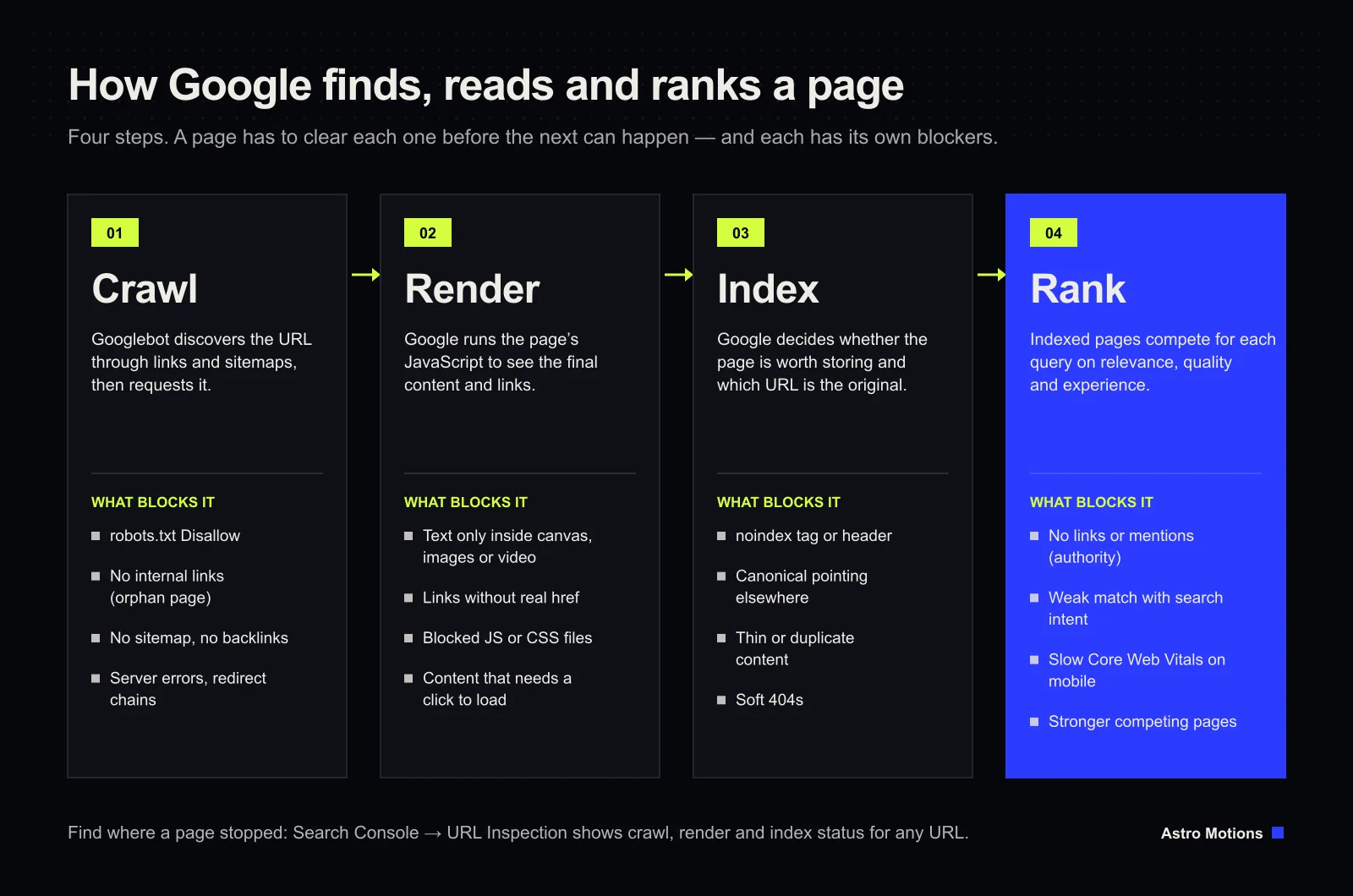
1. Google hasn't found the site yet
Google discovers pages by following links and reading sitemaps. A brand-new domain with no links pointing to it and no sitemap submitted can sit undiscovered for a while.
Example: a hypothetical bakery launches a new site on a fresh domain. Its old social profiles still link to the previous address, nobody has linked to the new one and no sitemap was submitted. Google has no path to it.
How to check: URL Inspection says "URL is not on Google", and the Page indexing report may list pages as "Discovered – currently not indexed" or not list them at all.
How to fix: verify the domain in Search Console, submit your XML sitemap under Sitemaps, update your social profiles and business listings to the new address, and use "Request indexing" for the most important pages. Then be patient — discovery on a new domain can take days to weeks.
2. robots.txt is blocking Google
The robots.txt file tells crawlers which parts of a site they may visit. A single line — Disallow: / — blocks the whole site, and it is surprisingly often left over from a staging server.
Example: a hypothetical agency builds a client site on a staging domain with crawling blocked, copies the files to the live domain on launch day and forgets the robots.txt came too.
How to check: open yourdomain.com/robots.txt in a browser and look for Disallow rules covering pages you want found. In Search Console, look for "Blocked by robots.txt" in the Page indexing report, and check the robots.txt report under Settings.
How to fix: remove or narrow the rule, make sure the file lists your sitemap, and request indexing again. Note that robots.txt controls crawling, not indexing: a blocked URL can still appear without a description, and Google cannot see a noindex tag on a page it is not allowed to fetch.
3. A noindex tag was left on
A noindex robots meta tag — or an X-Robots-Tag: noindex HTTP header — tells Google not to include a page even if it crawls it. Many website builders and CMS plugins have a "discourage search engines" switch that adds it everywhere.
Example: a hypothetical consultancy ticks "hide site from search engines" while the site is being built and nobody unticks it at launch.
How to check: URL Inspection reports "Excluded by 'noindex' tag". You can also view the page source and search for "noindex", or check the response headers in your browser's developer tools.
How to fix: remove the tag or header (or switch the CMS setting off), then request indexing for key pages.
4. The canonical tag points somewhere else
A canonical tag tells Google which URL is the "original" when several addresses show the same content. If it points to the wrong URL, Google will index that one instead — or nothing useful at all.
Example: a hypothetical online shop's template sets every product page's canonical to the home page, so Google treats hundreds of products as duplicates of it.
How to check: in URL Inspection, compare the "User-declared canonical" with the "Google-selected canonical". In the Page indexing report, look for "Alternate page with proper canonical tag" or "Duplicate, Google chose different canonical than user" on pages that should stand alone.
How to fix: give each page a self-referencing canonical on its preferred, live HTTPS address, and redirect the variants (http, non-www, trailing slash or not) to it.
5. The content only exists in JavaScript, images or a canvas
Google renders JavaScript, but it reads text, not pictures of text. Words painted into a WebGL canvas, baked into an image or buried in a video are, for search purposes, close to invisible. Links built without a real <a href> may not be followed at all.
Example: a hypothetical bakery's menu is a beautifully designed image. People can read "sourdough", "cinnamon buns" and "gluten-free" — Google sees one picture with no text, so the page never appears for those searches.
How to check: in URL Inspection, run Test live URL, then View tested page and read the rendered HTML. If your headline, prices or product names are not there as text, Google does not have them. Viewing the page with JavaScript switched off is a quick second test.
How to fix: put every important message in real HTML text, even if the design also shows it visually. Keep one clear H1 per page, use proper links, and give meaningful images descriptive alt text. Immersive design is fine — it just needs real text alongside it.
6. The pages are thin or duplicated
Google does not index everything it crawls. Pages that add little — a few lines of text, near-copies of other pages, auto-generated location pages — are often crawled and then left out.
Example: a hypothetical plumber publishes forty "plumber in [town]" pages with the same paragraph and only the town name changed. Most of them are never indexed.
How to check: look for "Crawled – currently not indexed" and "Duplicate without user-selected canonical" in the Page indexing report. Then compare your page honestly with the pages that do rank for the search.
How to fix: merge thin pages into fewer, stronger ones, and make each remaining page genuinely useful: specific details, real answers, examples and clear next steps. Fewer good pages beat many empty ones.
7. Nothing links to the page
An orphan page is one that no other page on your site links to. Google may never find it, and even if it is in the sitemap, the lack of internal links signals that it is not important.
Example: a hypothetical studio publishes a detailed case study but only shares it on social media. It is not linked from the portfolio, the menu or any related service page.
How to check: crawl your site with any SEO crawler and compare the URLs it finds with the URLs in your sitemap; pages in the sitemap but missing from the crawl are orphans. Search Console's Links report also shows your most internally linked pages.
How to fix: link every important page from at least one relevant page, using descriptive anchor text ("our organic SEO services", not "click here"), and keep key pages within a few clicks of the home page.
8. The site has no authority yet
This one is about ranking rather than indexing. Links from other websites are still one of the ways Google judges whether a site is trustworthy. A new site with no mentions anywhere usually ranks only for its own brand name at first.
Example: a hypothetical interior designer's site is fully indexed and appears when you search the studio's name, but not for "interior designer" in its city, where competitors have years of press, directory listings and partner links.
How to check: Search Console's Links report shows "Top linking sites". If the list is empty or full of irrelevant directories, authority is the gap.
How to fix: earn links rather than buy them — suppliers and partners, trade associations, local press, a complete Google Business Profile and content useful enough that others cite it. It is slow, and it compounds.
9. The site is slow on real phones
Speed rarely stops a page being indexed, but it affects how well it ranks and how many visitors stay. Google measures real-user experience with three Core Web Vitals, and a page passes when at least 75% of real visits (the 75th percentile) meet each threshold:
- Largest Contentful Paint (LCP) — the main content appears within 2.5 seconds.
- Interaction to Next Paint (INP) — the page responds to taps and clicks within 200 milliseconds.
- Cumulative Layout Shift (CLS) — the layout moves less than 0.1 while loading.
Example: a hypothetical architecture practice opens its home page with an uncompressed 12 MB video and a 3D model. On office Wi-Fi it feels fine; on a phone on 4G the headline takes several seconds to appear.
How to check: the Core Web Vitals report in Search Console groups your URLs as good, needs improvement or poor. PageSpeed Insights shows the same field data for a single URL, plus lab suggestions.
How to fix: compress and correctly size images and video, lazy-load anything below the fold, reserve space for images and embeds so the layout does not jump, cut unused JavaScript, and scale heavy effects down on weaker devices.
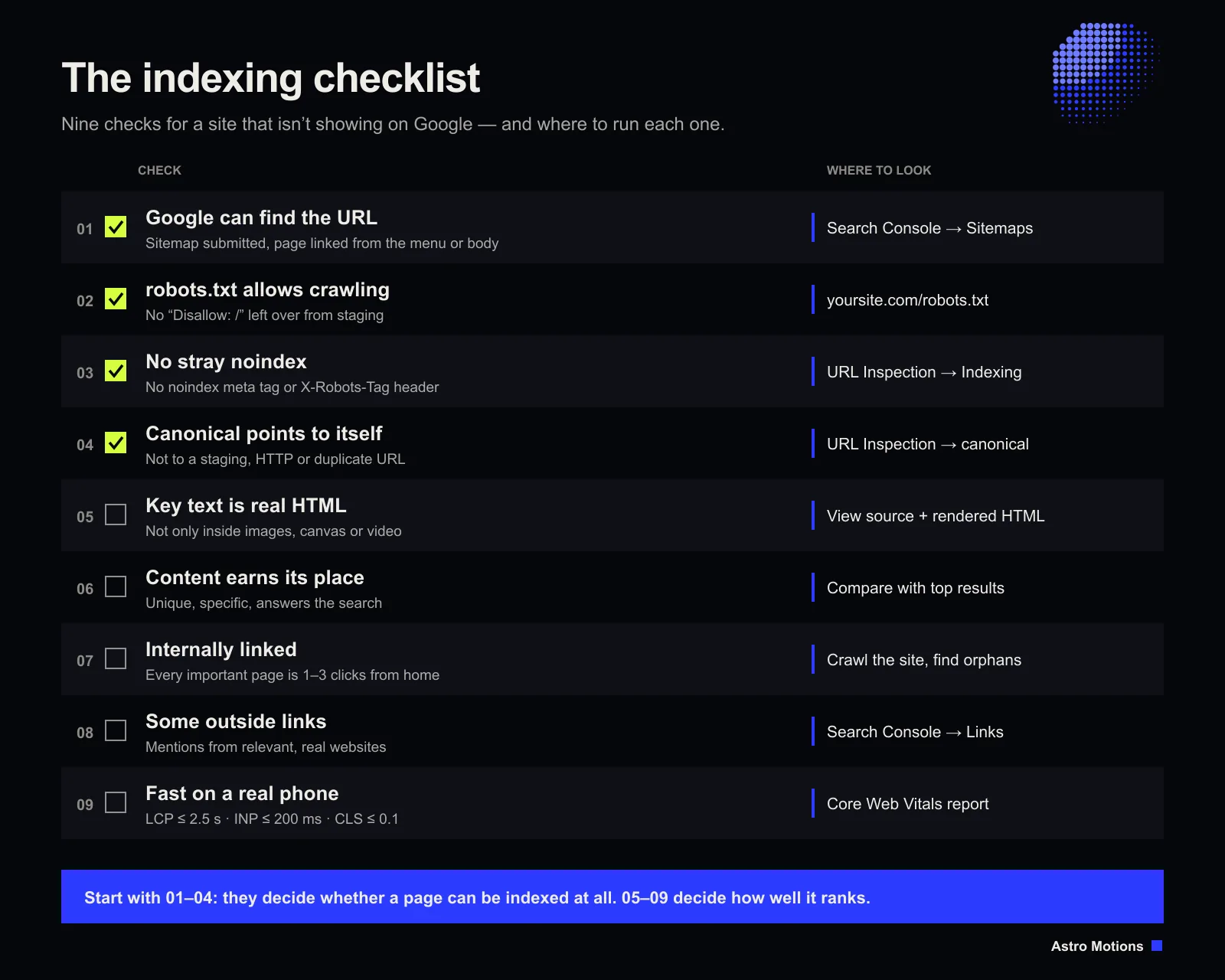
Summary: problems, symptoms and fixes
| Problem | Symptom | How to check | Fix |
|---|---|---|---|
| Not discovered | New site missing entirely | URL Inspection, Sitemaps report | Submit sitemap, add links, request indexing |
| robots.txt block | "Blocked by robots.txt" | yourdomain.com/robots.txt | Remove the Disallow rule |
| noindex left on | "Excluded by 'noindex' tag" | URL Inspection, page source | Remove tag or header |
| Wrong canonical | Another URL indexed instead | User- vs Google-selected canonical | Self-referencing canonicals, redirects |
| Text not in HTML | Indexed but invisible for key terms | Rendered HTML in URL Inspection | Real text, real links, alt text |
| Thin or duplicate pages | "Crawled – currently not indexed" | Page indexing report | Merge and improve content |
| Orphan pages | Pages found late or never | Site crawl vs sitemap | Internal links with clear anchors |
| No authority | Ranks for brand name only | Links report | Earn relevant links and mentions |
| Slow on mobile | Poor Core Web Vitals | Core Web Vitals report | Lighter media, less JS, stable layout |
Frequently asked questions
How long does it take a new website to show up on Google?
There is no fixed time. Some pages are indexed within days of submitting a sitemap; on a brand-new domain with no links it can take a few weeks. Ranking for competitive searches takes much longer than being indexed.
Does submitting a sitemap guarantee my pages will be indexed?
No. A sitemap helps Google find pages; it does not oblige Google to index them. Pages still need to be crawlable, free of noindex tags and worth indexing.
Why does my site appear for its name but not for my services?
That usually means it is indexed but not ranking. Look at reasons 5 to 9: whether your service pages have real, specific text, whether they are linked internally, whether other sites mention you and how fast the pages are.
Can I pay Google to index my site faster?
No. Ads appear in their own labelled slots and have no effect on organic indexing or rankings. PPC can bring traffic while SEO builds, but the two are separate systems.
The best of both
A remarkable website and strong search visibility are not opposites. Build the experience for people and the structure for search engines, and you get a site that is remembered and found. That is how we approach every web design project, and it is where our organic SEO work begins. If you have worked through this list and your site is still missing, send us the URL — we will tell you what we see.